Did you know you can transcode plain JPEG images to JPEG XL, and you can reconstruct the original bit-perfect JPEG? The best part is that the transcoded JPEG XL images are typically around 20% smaller than the original.
This program is a command line (CLI) tool that batch transcodes JPEG images to JPEG XL images, and back forth (reconstructing JPEG).
The tool works on Linux, FreeBSD, macOS and Microsoft® Windows™.
While transcoding, directory structure and file modification times are preserved.
Non-JPEG files such as *.mp4 and *.mov are copied to the new destination without modification.
This behavior makes it perfect for archival purposes.
Performance is the key advantage of using this program. This program is implemented in C++, and uses oneAPI Thread Building Blocks (TBB) to utilize multiple processor cores for transcoding. Also reduces memory usage through the use of memory mapping in zero-copy fashion.
Usage
Example: transcode
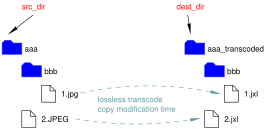
jxltree aaa aaa_transcodedUse jxltree like this to transcode JPEG images to JPEG XL images:
jxltree src_dir dest_dir
This does the following operations:
- Creates directory structure below
src_dirtodest_dir(also see the figure above). - Transcode
*.jpgor*.jpeg(case insensitive) to path in thedest_dir. - Copy non-JPEG files to corresponding directory under
dest_dir. - Set modification time of the transcoded JPEG XL file identical to source JPEG file.
- Report number of files transcoded and copied, and number of errors.
This is a lossless process; the resulting JXL files can be used to reconstruct the original JPEG bit-perfectly.
Optionally use -e effort to balance between speed and compression ratio. Default is 10 for maximum compression.
-v option can be used to show transcoding progress before processing each file.
Transcoding is a computationally intensive process and it takes a fair amount of memory depending on the source image size and number of threads.
Use -j threads to adjust the number of threads used.
This defaults to the number of logical processors available.
Example: reconstruct
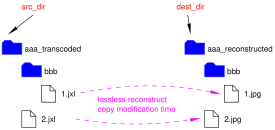
jxltree -r aaa aaa_transcoded-r option is used for reconstructing JPEG files from transcoded JPEG XL files:
jxltree -r src_dir dest_dir
This works like this:
- Creates directory structure below
src_dirtodest_dir(also see the figure above). - When
*.jxl(case insensitive) is found insrc_dir, reconstruct JPEG in the corresponding path in thedest_dir, replacing the file name extension to.jpg. - Copy non-JXL files to corresponding directory under
dest_dir. - Set modification time of the reconstructed JPEG file identical to source JPEG XL file.
- Report number of files reconstructed and copied, and number of errors.
-v and -j options can be used in the same manner as transcoding.
Download
Building Tips
Please refer to README.md for details.
Linux, FreeBSD and macOS
These platforms use GNU Make and Makefile for building.
- boost-interprocess, libjxl, libtbb and cli11 are needed.
- See bundled
Containerfilefor packages required when building in Debian. - Equivalent packages are found in opensuse, FreeBSD ports, and macOS Homebrew too.
- See bundled
- For FreeBSD and macOS that uses clang++ and libc++, you need to add
-fexperimental-librarytoCXXFLAGSin theMakefile.- For macOS, you also need to adjust like
-I/opt/homebrew/includeand-L/opt/homebrew/lib.
- For macOS, you also need to adjust like
For Linux on AArch64 platform, OCI Container (Docker container) image is available at the GitLab Container Registry for convenience.
Microsoft® Windows™
This program is built using Microsoft® Visual C++™ 2026 with CMake and vcpkg bundled with the Visual Studio™.
The author used community edition of the said software.
For detailed building procedure see README.md.
Prebuilt binaries for x64
and arm64
architectures are available at GitLab releases page and Vector website above for convenience.
License
Apache-2.0